Pet with your hands
Stroke Mochi's head, back or chin with your real hands. It leans in, wags and remembers you were kind.

Mixed reality · Meta Quest
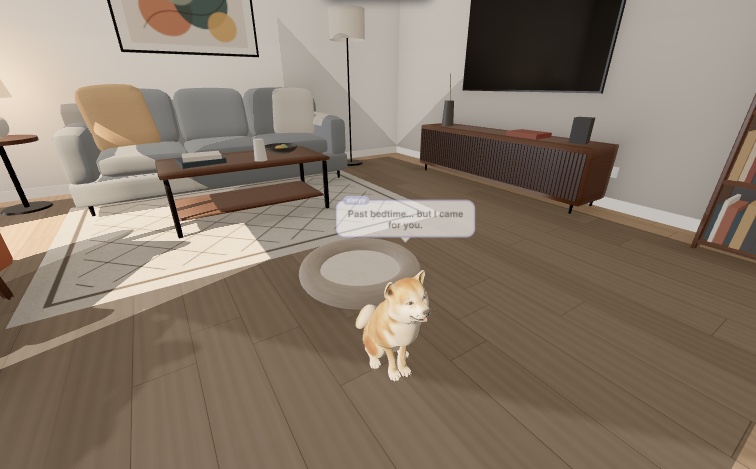
Mochi is a Shiba Inu puppy who lives in your space. Pet it with your hands, throw the ball, fill its bowl, and it comes running when you call.
Best in Quest Browser on Meta Quest 3 / 3S. Also runs in a desktop browser.
Meet Mochi
Real animations, real sounds and a small AI mind that decides what Mochi feels like doing next.
Stroke Mochi's head, back or chin with your real hands. It leans in, wags and remembers you were kind.
Throw the tennis ball. Mochi chases it, picks it up in its mouth, brings it back and waits for the next throw.
Fill the bowl and Mochi trots over to eat. When it's hungry, it sits by the bowl and asks you.
Mochi has its own bed, gets sleepy in the evening and wakes up with a big stretch.
Say Mochi, come here
, sit
or fetch
. Commands are understood on the device, instantly.
An AI mind picks what Mochi wants to do and says how it feels: Good morning! You're back!
Your room or ours
See your own room through the headset, with Mochi in it.
A full VR room with a sofa, rug and a big window, and Mochi living in it.
How to play
Use Quest Browser. Find a spot to sit down with a little floor space in front of you.
Allow the headset to use your space. Mochi's bed appears on the floor beside you.
Reach out to pet it, toss the ball or call its name. On a computer, use the keys 1–9.

Put on your headset and say hello.
Mochi is waking up…